
CKYC Search
Overview
CKYC is a Government of India initiative - Central KYC (Know Your Customer) - that lets a customer complete their KYC once and reuse it across multiple Financial Services entities, instead of repeating full KYC each time they onboard with a new Reporting Entity (RE).
The registry is operated by CERSAI (Central Registry of Securitization Asset Reconstruction and Security Interest of India), which acts as the Central KYC Registry (CKYCR). CKYCRR 2.0 is CERSAI's upgraded version of this registry, introducing revised data structures, stricter match handling, and updated record-level fields compared to the legacy (1.x) system.
Decentro integrates with Protean eGov Technologies, CERSAI's empanelled registry provider, and exposes a simplified Search capability on top. Platforms and regulated entities that already hold RE credentials can use Decentro's layer to go live without integrating with Protean or CERSAI directly.
CKYC Search
The Search capability lets a Reporting Entity check whether a given customer already has a KYC record on the CKYCRR 2.0 repository, before starting a fresh onboarding or KYC collection flow.
- If a matching record exists, the RE can proceed to download the stored KYC record (via the Download capability) instead of re-collecting documents from the customer.
- If no record exists, the RE proceeds with a fresh KYC capture, which can later be pushed to the registry via the Upload capability.
- If more than one record could plausibly match the details submitted, the registry returns a Probable Match set instead of a single confirmed record — see the dedicated section below.
What's updated in CKYC 2.0
These are the confirmed, search-relevant behavioural changes between legacy CKYC and CKYCRR 2.0:
- Enforced Search before Create
- New search criterions introduced for better Success rates
- CKYC Number (KIN)
- Name + Photo
- Relative
- CKYC alias
- Supports Multi OVD-ID Search. The search result also suggests the match is found with which input.
CKYC Search API can be used by the platform to check if they are present on the CKYC repository. The platform can access the download ONLY if the customer is present with the repository.
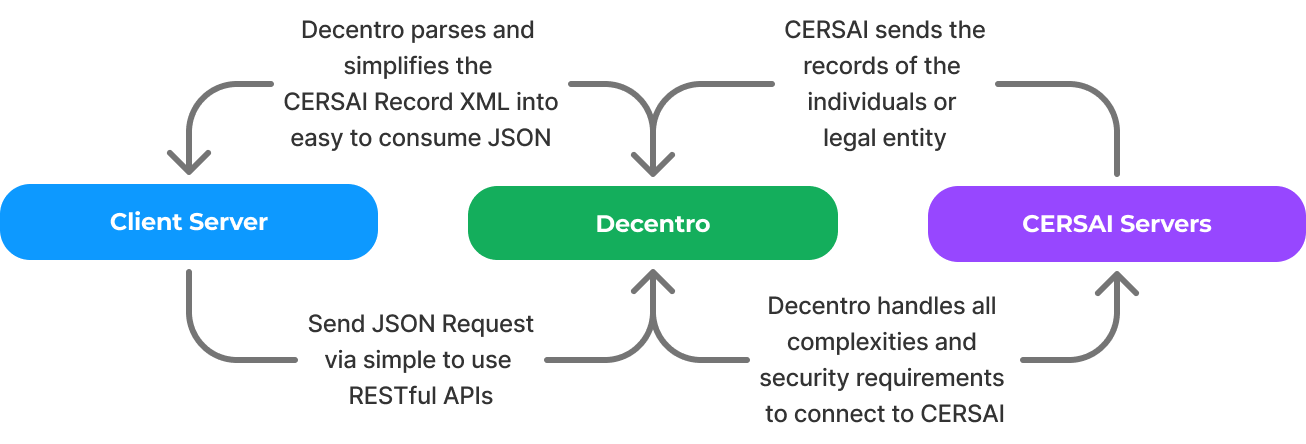
CKYC Search can be undertaken using one of the following inputs:
Document Type
| Document | Type | ID Number | CKYC 1.x | CKYC 2.0 |
|---|---|---|---|---|
| PAN | PAN | 10 digit PAN number of that person. Example: "AAAAA1111A". | Yes | Yes |
| Aadhaar | AADHAAR | A combination of 4 details: 'last 4 digits of AADHAAR', 'Name as on AADHAAR', 'Date of birth as on AADHAAR in DD-MM-YYYY format' and Gender: Male 'M', Female 'F' or Other 'T'). | Yes | Yes |
| Passport | Passport | A valid Passport number of the customer. | Yes | Yes |
| Voter ID | Voter_Id | A valid Voter ID number of the customer. | Yes | Yes |
| Driving License | Driving_License | A valid Driving Licence number of the customer. | Yes | Yes |
| CKYC Number (KIN) | Ckyc_Id | A valid 14 digit CKYC number of the customer. | No | Yes |
| Mobile | MOBILE | A valid 10 digit 10 digit contact number of the customer registered with CKYC | Yes | Yes |
| Relative | RELATIVE | A valid combination of Name + Gender+ Date of Birth + Relation + Relation Name of the customer as per the CKYC records | No | Yes |
| Verifiable Credentials | - | A valid CKYC Alias given to a customer | No | Yes |
| Name + Photo Match | - | A valid name and base64 photo combination of the customer as per CKYC records. | No | Yes |
CKYC Bulk Search 1.x
Self Hosted Stack
This API accepts a Document Type and its corresponding ID number in an object to initiate the Bulk Search flow.
{
    "reference_id": "463a9388-1c1b-470e-9fdc-457cbc661700",
    "consent": true,
    "purpose": "for testing purpose only",
    "ids": [
        {
            "document_type": "PAN",
            "id_number": "ABCDE0123F"
        },
        {
            "document_type": "AADHAAR",
            "id_number": "XXXXXXXX1998",
            "name": "ABC",
            "dob": "1990-00-01",
            "gender": "MALE"
        }
    ]
}'
{
  "attempt": 1,
  "referenceId": "04e83fc3-ea09-4ad3-bf6c-027c0367196e",
  "bulkDecentroTxnId": "F2EC6FDEA9184933B7D1E8C964317463",
  "callbackTxnId": "32B89BC544DD4F0182A41F06F608ED29",
  "originalCallbackTxnId": "32B89BC544DD4F0182A41F06F608ED29",
  "timestamp": "2025-07-16T13:03:51.309017",
  "creationTimestamp": "2025-07-16T12:53:43.000000",
  "lastModificationTimestamp": "2025-07-16T12:53:43.000000",
  "type": "BULK_CKYC_SEARCH",
  "stage": "RECORDS_SEARCH_SUCCESSFUL",
  "status": "COMPLETED",
  "description": "Records searched successfully.",
  "batchNo": 1,
  "data": [
    {
      "documentType": "PAN",
      "idNumber": "ABCDE01234F",
      "message": "KYC Details from CKYC retrieved successfully.",
      "kycStatus": "SUCCESS",
      "kycResult": {
        "ckycId": "XXXXXXXXXX0001",
        "ckycReferenceId": "AAAAAA00000000",
        "fullName": "ABC",
        "identityDetails": {
          "identity": [
            { "type": "PAN", "status": "03" },
            { "type": "Aadhaar", "status": "03" }
          ]
        }
      }
    },
    {
      "documentType": "AADHAAR",
      "idNumber": "XXXXXXXX1998",
      "name": "ABC",
      "dob": "1990-01-01",
      "gender": "M",
      "message": "KYC Details from CKYC retrieved successfully.",
      "kycStatus": "SUCCESS",
      "kycResult": {
        "ckycId": "XXXXXXXXXX0001",
        "ckycReferenceId": "AAAAAA00000000",
        "fullName": "ABC",
        "identityDetails": {
          "identity": [
            { "type": "PAN", "status": "03" },
            { "type": "Aadhaar", "status": "03" }
          ]
        }
      }
    }
  ]
}
Callback Acknowledgment Requirement
To ensure successful processing and acknowledgment of callbacks, the client must respond with the following payload upon receiving any callback (including bulk search, download, and upload callbacks):
{
  "response_code": "CB_S00000"
}
Note: This is a mandatory requirement. Please ensure this is implemented to prevent callback retries or failures.
Updated 2 months ago